
Integrations
Shopify Integration
Connect your Shopify store to DeelFlows to sync products, track checkout and order events, and build automated customer Journeys.
Reviewed by Mahmoud Ilyan · updated
What it is
The Shopify integration connects your store to DeelFlows using Shopify's native app platform.
Automatically sync your product catalog, collections, and inventory in real-time.
Receive checkout created, order placed, order fulfilled, and refund events to power your automation.
When to use it
- When you want to recover abandoned checkouts by sending WhatsApp reminders to Contacts.
- When you need to notify Contacts about order confirmations, shipping, or delivery updates.
- When you want to build post-purchase Journeys based on product purchases or order value.
- When you want to recommend products dynamically in WhatsApp Broadcasts or Journeys.
Step by step
1. Install the DeelFlows App from Shopify
Go to Settings → Integrations in DeelFlows and click Connect next to Shopify.
You'll be redirected to the Shopify App Store to authorize the DeelFlows app.
Grant the necessary permissions: read products, read orders, read customers, and read inventory.
Once authorized, you'll be redirected back to DeelFlows with a confirmed connection.
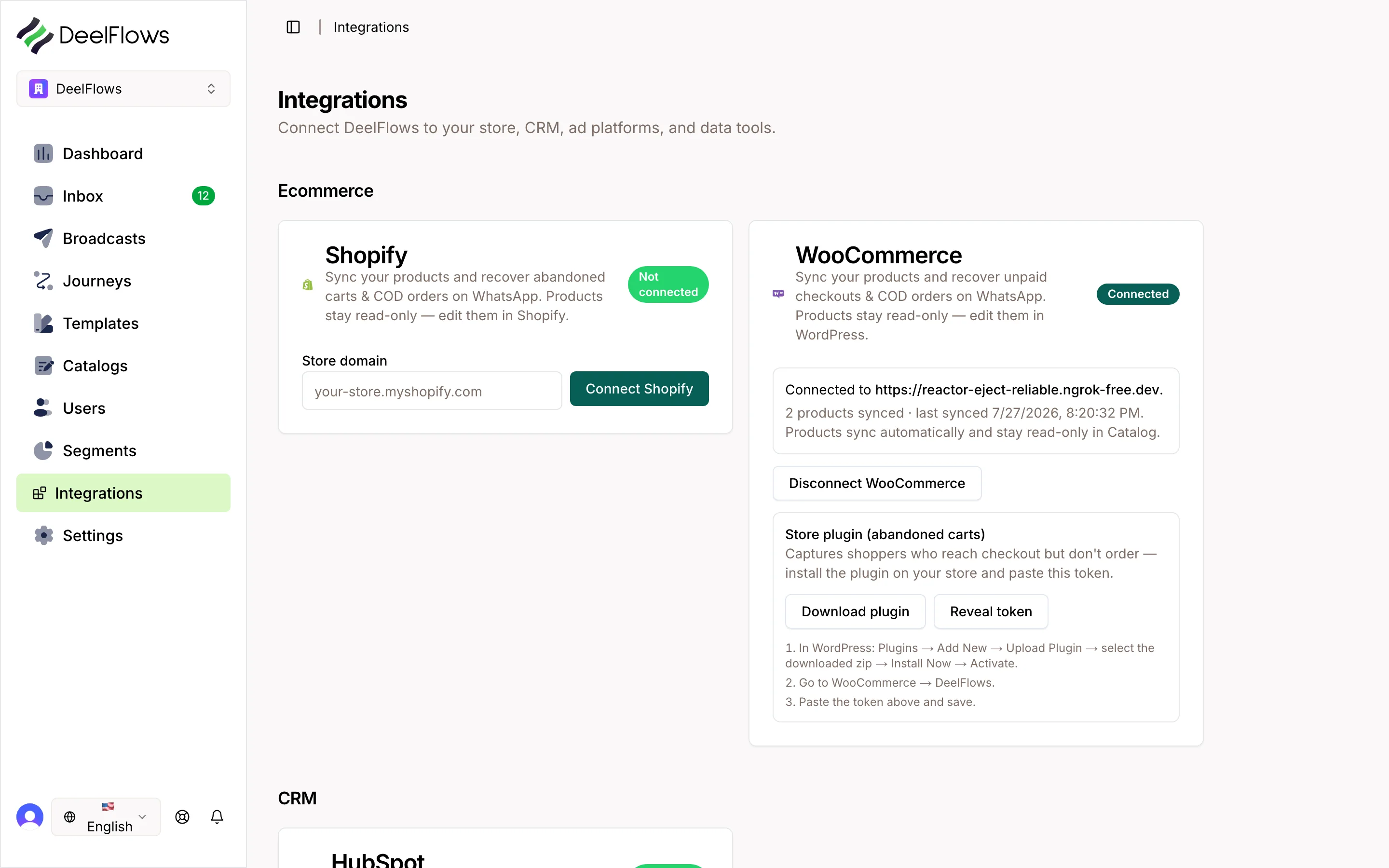
2. Sync Your Product Catalog
After installation, navigate to Settings → Integrations → Shopify and enable product catalog sync.
Choose which data to sync: product titles, descriptions, images, pricing, inventory levels, and collections.
The initial sync begins immediately and runs in the background. You'll receive a notification when complete.
Products are kept in sync automatically as you update them in Shopify.
3. Enable Checkout and Order Events
In the integration settings, enable checkout and order event tracking.
Checkout created events fire when a customer reaches checkout but doesn't complete payment.
Order placed, order paid, order fulfilled, and order cancelled events trigger automatically.
These events become available as Journey triggers and Segment conditions.
4. Map Customer Data to Contacts
DeelFlows automatically creates or updates Contact records when customers interact with your store.
Customer email, phone, and name are synced as user properties.
Purchase history, lifetime value, and order count are calculated automatically and updated in real-time.
5. Test the Integration
Place a test order on your Shopify store and verify the events appear in DeelFlows under Contacts → Activity.
Create a test checkout without completing payment to confirm checkout created events are firing.
Check that products and collections are visible in Settings → Integrations → Shopify.
FAQ & gotchas
Does the integration work with Shopify Plus?
Yes. The DeelFlows app works with all Shopify plans including Shopify Plus. Advanced features like wholesale channels and custom checkouts are supported.
Can I sync historical order data?
Yes. During initial setup, you can choose to import historical orders from the past 90 days to populate Contact purchase history.
What happens if I uninstall the app?
Uninstalling the app stops all future syncing and event tracking. Existing Contact data and historical events are preserved in DeelFlows.
Can I filter which products sync to DeelFlows?
Yes. You can filter products by collection, product type, vendor, or tags to sync only specific catalog subsets.
How do refunds and cancellations work?
Refund and cancellation events are tracked separately. You can trigger Journeys or update Segments based on these events to handle customer service workflows.
Continue learning
Related articles
Salla Integration
Install DeelFlows from the Salla App Store and connect your store in one click to confirm COD orders and recover pending checkouts over WhatsApp.
→HubSpot Integration
Connect HubSpot to DeelFlows to sync contact lists, segments, and engagement data between platforms.
→Zapier and Make Integration
Connect DeelFlows to thousands of apps using Zapier or Make to automate workflows and data sync.
→Public API and Write Keys
Generate and manage API keys to connect external apps, ingest data, and automate workflows with DeelFlows.
→Can't find what you're looking for?
Contact Support