
Quick Start
What is DeelFlows?
Learn how DeelFlows helps you automate WhatsApp marketing and recover abandoned carts.
Reviewed by Mahmoud Ilyan · updated
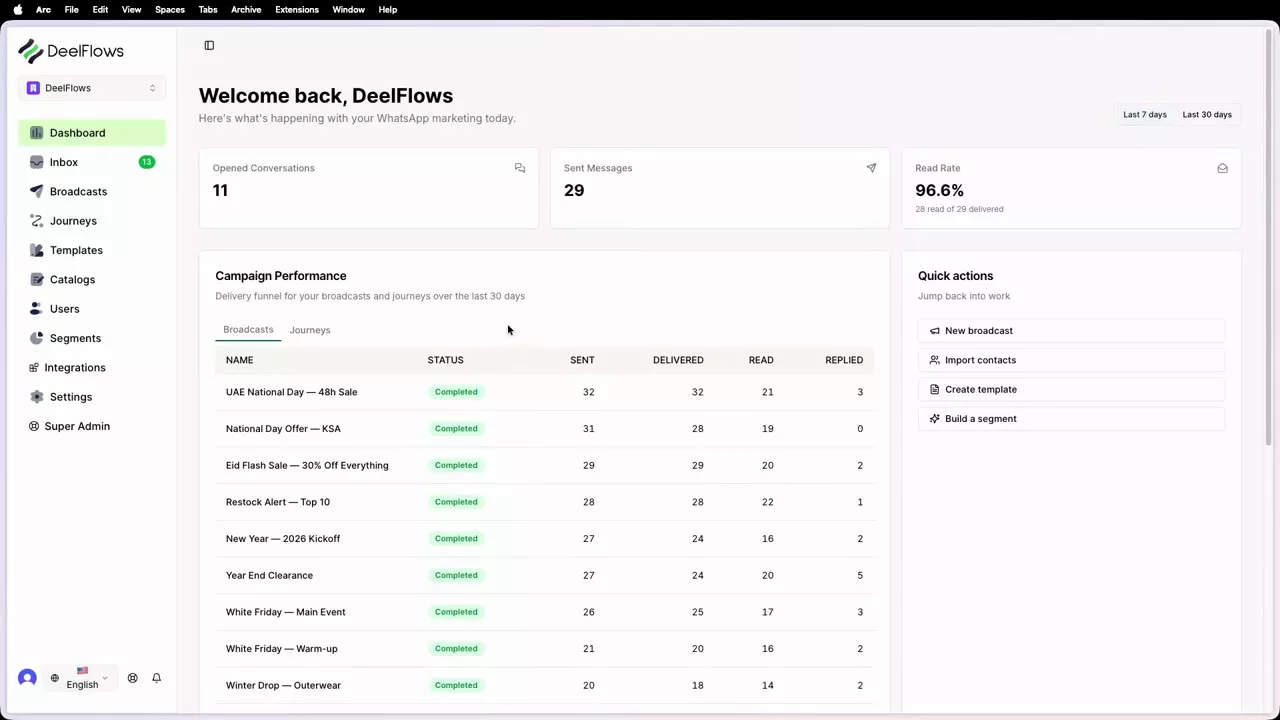 1:36
1:36Video needed
Watch video guide →
What it is
DeelFlows is a WhatsApp marketing automation platform built for ecommerce businesses. It connects to your WhatsApp Business Account and helps you send automated messages to your Contacts.
You can recover abandoned carts, send order updates, run promotional Broadcasts, and build automated Journeys that guide Contacts through your sales funnel. Everything happens inside WhatsApp, where your customers already spend their time.
DeelFlows works with Shopify, WooCommerce, and other ecommerce platforms. It tracks Contacts, their user properties, and their interactions with your store so you can send the right message at the right time.
When to use it
- You want to recover lost sales from abandoned carts
- You need to send order confirmations and shipping updates via WhatsApp
- You want to run promotional campaigns to your Contact list
- You need to automate customer support conversations
- You want to segment Contacts and send personalized messages based on their behavior
Step by step
1. Watch the product tour
Start by watching our 3-minute product tour. It shows you the main features and how they work together.
You'll see how to connect your WhatsApp account, import Contacts, create your first Broadcast, and build an automated Journey.
2. Connect your WhatsApp Business Account
Go to Settings → Integrations in your Workspace. Click Connect WhatsApp Business.
Follow the steps to link your WhatsApp Business Account. This takes about 2 minutes.
Once connected, you can start sending messages through DeelFlows.
3. Connect your ecommerce store
Go to Settings → Integrations and find your platform (Shopify, WooCommerce, or other).
Follow the connection steps. DeelFlows will start syncing your customer data and order events.
This lets you track cart abandonment, order status, and customer behavior automatically.
4. Import your first Contacts
Go to Contacts → Import to upload a CSV or Excel file with phone numbers.
Make sure phone numbers are in E.164 format (e.g. +14155552671).
DeelFlows will add these Contacts to your Workspace and mark them as opted in if they came from your existing customer list.
5. Create your first Template
Go to Templates and click Create Template. Choose a Marketing or Utility Template.
Write your message and add merge tags like {{name}} to personalize it.
Submit it for Meta approval. This usually takes 24 hours.
Once approved, you can use this Template in Broadcasts and Journeys.
6. Send your first Broadcast
Go to Broadcasts and click New Broadcast. Choose a Segment or select Contacts manually.
Pick an approved Template and schedule when to send it.
DeelFlows will send the message to all Contacts in your Segment during their open session windows.
FAQ & gotchas
Do I need a WhatsApp Business Account?
Yes. DeelFlows connects to the official WhatsApp Business API, not the WhatsApp Business App. If you don't have an account yet, you can create one through Meta Business Suite or during the DeelFlows setup process.
How much does WhatsApp messaging cost?
Since 1 July 2025 Meta charges per delivered template message, at a rate set by the recipient's country and the category (marketing, utility, or authentication). Marketing messages cost the most; utility and authentication cost less. From 1 October 2026, replies and utility templates sent inside the 24-hour customer service window are charged at your market's utility rate after 1,000 free service messages per phone number each month. Chats that start from a Click-to-WhatsApp ad or Facebook Page button stay free for 72 hours. DeelFlows does not add extra messaging fees on top of Meta's rates.
Can I send messages to anyone?
No. Contacts must be opted in before you can send them Marketing messages. You can only message Contacts who have given you permission to contact them on WhatsApp. DeelFlows tracks opt-in status automatically.
What's the difference between a Broadcast and a Journey?
A Broadcast is a one-time message sent to a Segment of Contacts. A Journey is an automated series of messages triggered by events like cart abandonment or product purchase. Broadcasts are manual, Journeys are automatic.
Continue learning
Related articles
Invite Team Members
Add Operators to your Workspace so your team can manage Contacts and campaigns together.
→Import Contacts from CSV or Excel
Upload your customer list to DeelFlows so you can start sending WhatsApp messages.
→Dashboard Overview
Understand the key metrics and charts on your DeelFlows dashboard.
→DeelFlows Glossary
Common terms and concepts used throughout DeelFlows.
→Can't find what you're looking for?
Contact Support